Skip to content
India runs 15+ billion UPI payments every month

BachaoPe — Free UPI QR Code Safety Scanner

That QR at the chai stall could send your money to a scammer. Check it first.

Free UPI QR code safety scanner for Android. Point your camera at any UPI QR — Bachao decodes it on your phone and gives a Safe / Suspicious / Fraud verdict before you pay.

Freefor everyone
Androiddownload & use
< 5 secverdict time
On-deviceQR decode
Free appAndroid APKEmail sign-in onlyOn-device QR decodeNo images uploaded
Free Android app

Get BachaoPe — the UPI QR Scanner

Check any UPI QR before you pay — right at the shop counter. Free, sign in with your email, and it only ever asks for Camera and network access.

Android 7.0+ · v1.0.0 · Google Play listing coming soon. Direct APK by Dhisattva AI Pvt Ltd, a DPIIT-recognised startup.

  1. 1.Tap Download APK.
  2. 2.Open the file & allow install from this source.
  3. 3.Sign in with your email (one-time code).
  4. 4.Point the camera at any UPI QR.

How it works

Every QR scam relies on one weakness: your phone acting on the code before anyone checks it. Bachao flips that order.

A typical scanner — scan & actScan QRAuto-opens link /auto-fills paymentPhishing · malware ·money goneBachao — decode & inspectScan QRDecode on phone,never auto-actScore against35+ rulesShow verdictYou decide —safely
Decode & inspect, never scan & act — the verdict comes back before any link opens or any rupee moves.
1Point your camera

Open the app and point it at any UPI QR — a shop sticker, a PhonePe/GPay/Paytm code, or a bank QR. No screenshot or typing needed.

2Decoded & checked on your phone

The QR is decoded on-device. Only the decoded UPI text is sent for a safety check — the explainable rule engine scores it across 35+ handles and known scam patterns.

3Get a clear verdict

Safe, Suspicious, High-Risk or Fraud — with the exact reasons. Pay with confidence, or walk away before a single rupee moves.

UPI payloadpa · pn · amParse fieldsGenuine handle allowlist35+ bank & PSP handlesLook-alike / typo VPApaytrn→paytm, yb1→yblBait-keyword handlerefund · cashback · KYCAmount & digit anomalypre-filled high amountRisk score0 – 100Safe 0–20Suspicious 21–45High 46–70Fraud 71+
The verdict pipeline — explainable rules feed a 0–100 risk score and a four-band verdict. Every flag is human-readable.

Try it right now — scan these test QR codes

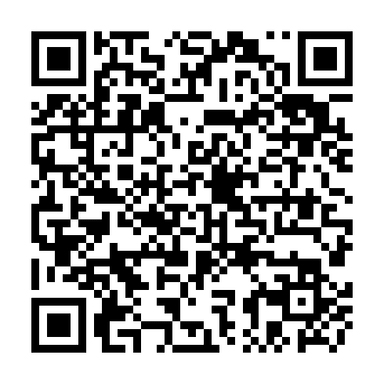
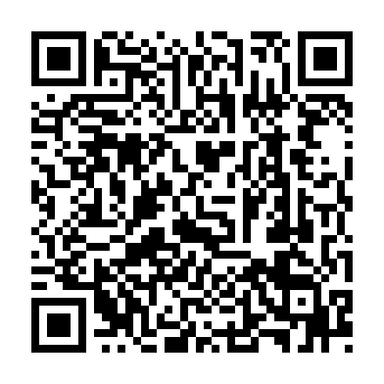
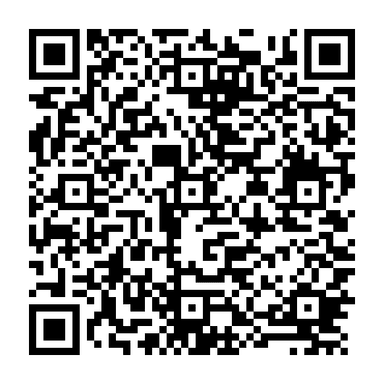
Open the app and point it at each code below to see exactly how a Safe, Suspicious and Fraud verdict looks. These are demo codes — they don’t move any real money.

Sample UPI QR code that Bachao rates as Safe
Safe

A genuine-looking payment

Pays bachao@oksbi. Real bank handle (@oksbi), no bait words, no pre-filled amount — risk score 0.

Sample UPI QR code that Bachao rates as Suspicious
Suspicious

A bait-keyword UPI ID

The UPI ID is kyc-update-refund@ybl. The handle is real, but ‘KYC update’ is a classic scam bait — flagged Suspicious.

Sample UPI QR code that Bachao rates as Fraud
Fraud

A look-alike spoof

Pays rewards@paytrn — ‘paytrn’ mimics ‘paytm’ and isn’t a known handle. Risk score 75 — do not pay.

No app yet? Download it free and come back to this page.

What the scanner checks

Four layers of explainable checks between you and a fraudulent UPI QR code.

Genuine handle check

Every UPI ID ends in a bank/PSP handle (@oksbi, @ybl, @paytm, @okaxis…). Bachao matches it against an allowlist of 35+ genuine handles and flags anything unknown.

Look-alike / typo-squat VPA

Catches spoofs the eye misses — yb1 posing as ybl, okzbi as oksbi, paytrn as paytm. A single swapped character is exactly how fake-QR fraud works.

Bait-keyword detection

Scam UPI IDs hide behind words like refund-pending, kyc-update, cashback-reward and prize-claim. Bachao flags these social-engineering baits in the handle.

Amount & pattern anomalies

Pre-filled high amounts (over ₹10,000), excessive digits and abnormally long IDs all raise the risk score. Every flag is explained in plain English — no black box.

Why Bachao — vs checking a QR by eye

A swapped sticker or a one-character UPI ID is invisible to the human eye. The app spots it in seconds.

What mattersChecking by eyeBachaoPe
SpeedSquint at the UPI ID, hope for the bestClear verdict in under 5 seconds
Look-alike handleNearly impossible to spot (yb1 vs ybl)Typo-squat detection built in
Genuine PSP handleYou don’t carry the list of 35+ handlesAllowlist match on every scan
Bait words & high amountEasy to miss in a hurryAuto-flagged with the reason
PrivacyPreview tools fetch the link & leak your IPDecodes on your phone, no auto-fetch
CostFree, but unreliableFree app, no signup beyond email

Frequently asked questions

Straight answers about UPI QR safety and the app.

Can a QR code steal money from your bank account?

A QR code can’t run a virus by itself — it’s just text (a link, a UPI string, Wi-Fi details). The danger is what your phone does automatically with that text: open a phishing site, or trigger a payment. Bachao breaks that chain — it decodes and inspects the QR and shows you a verdict before any link opens or any money moves.

How do I check if a UPI QR code is fake before paying?

Download the free BachaoPe app, point it at the QR, and read the verdict. It extracts the UPI ID (VPA), checks the bank handle against 35+ genuine handles, looks for look-alike/typo-squat spoofs and scam bait words, and flags pre-filled high amounts — all in under 5 seconds, with the reasons spelled out.

Is it safe to scan an unknown QR code for payment?

With an ordinary scanner, no — many apps auto-open the link or fetch it to make a preview, which can leak your IP and device details to the attacker. Bachao is safe to use on unknown QRs because it decodes on your device and never auto-opens or auto-fetches the QR’s contents. You always decide after seeing the verdict.

Is the app free? Do I need to sign up?

Yes, it’s free. You sign in with just your email and a one-time code (OTP) — no password and no payment information. The app asks for Camera (to read the QR) and network access (to run the check) — and nothing sensitive: no storage, contacts, location, SMS or microphone access.

Which UPI apps does it work with?

Any UPI QR — PhonePe, Google Pay, Paytm, BHIM, Amazon Pay, CRED, or a bank’s own QR. Bachao only checks the code; if you choose to pay after a Safe verdict, it hands a clean UPI link to your own UPI app so you complete the payment exactly as usual.

What should I do if a QR is flagged as fraud?

Do not pay. If you’re at a shop, tell the owner — their QR sticker may have been swapped. If you’ve already lost money to a UPI scam, report it immediately at cybercrime.gov.in or call the 1930 cyber-crime helpline; the chargeback window for UPI fraud is narrow, so act fast.

Does Bachao see my bank details or payments?

No. Bachao never sees your UPI PIN, bank login or card details — those stay inside your UPI app. Bachao only analyses the decoded QR text to produce a verdict. The camera image is used only to decode the QR on your phone and is not uploaded.

Check the QR before you pay. It's free.

Download the free Android app and know if a UPI QR is safe in under 5 seconds — before a single rupee moves.

Download for Android
UPI QR fraud — what to know

The common UPI QR code scams in India (2026)

The patterns Bachao is tuned for: (1) Fake-QR sticker swap — a scammer pastes their own QR over a genuine shop QR, so your money goes to them; (2) Look-alike VPA — a UPI ID one character off a trusted brand (yb1 instead of ybl, paytrn instead of paytm); (3) Bait-keyword handle — IDs built around ‘refund’, ‘KYC update’, ‘cashback reward’ or ‘prize claim’ to manufacture urgency; (4) Pre-filled high amount — a QR that quietly fills in a large sum hoping you pay without checking; (5) Quishing — a QR that hides a phishing link instead of a payment. Each of these is a thing your phone would otherwise act on automatically.

How Bachao detects a fake or spoofed UPI ID

Bachao decodes the QR on your device and runs an explainable, deterministic rule engine — not a black box. It parses the UPI payload (pa = the VPA, pn = payee name, am = amount), checks the handle after the @ against an allowlist of 35+ genuine bank and PSP handles, runs typo-squat detection for known look-alike handles, screens the ID for fraud-bait keyword patterns, and flags excessive digits, abnormally long IDs and hardcoded high amounts. The result is a 0–100 risk score mapped to four bands — Safe (0–20), Suspicious (21–45), High-Risk (46–70) and Fraud (71–100) — with every flag written in plain English so you understand exactly why.

Why ‘decode & inspect’ protects your privacy

Most QR scanners follow a ‘scan & act’ model: the moment you scan, they open the URL or fetch it to render a preview. That single automatic fetch can leak your IP address, approximate location and device fingerprint to the attacker’s server — before you’ve decided to trust anything. Bachao inverts the order: decode locally, classify, score, then show the verdict. It never auto-opens a link or auto-fetches QR contents, so a safety check doesn’t itself leak your data or move money. The app requests only Camera and Internet permissions.

For merchants, banks and fintechs — the verdict engine via API

The same explainable engine that powers the consumer app is available to businesses as a REST API/SDK, so you can screen payee VPAs at merchant onboarding, re-verify printed QRs in the field, or add a pre-payment risk signal to your own product — with an admin dashboard and an audit log suited to governance reporting. Live VPA-registry verification against the NPCI directory and URL-reputation checks for quishing are on the roadmap and delivered on a committed pilot timeline. Book a call to scope an integration.

Report a suspicious QR — cyber-crime helpline 1930

If you’ve already lost money to a UPI scam, file an immediate report on the National Cyber Crime Reporting Portal (cybercrime.gov.in) or call 1930 — the sooner the better, since the chargeback window for UPI fraud is narrow. Keep the QR image, the UPI ID (VPA), the transaction reference number (UTR) and the timestamp ready before you call. Running the QR through Bachao first gives you a clear, timestamped record of the red flags to share with your bank or the helpline.

Find your vulnerabilitiesStart free scan →